Over the past few days, I have had a very strong feeling: Codex has shifted from “a coding assistant that can write code” to “a supervised execution layer for software engineering.” At first I thought the turning point was around May 11, because that was when I refactored one of my toy projects from a single-file demo into a modular project. After checking the official timeline, the picture became clearer: OpenAI announced the Codex mobile remote-work preview on 2026-05-14, and the broader desktop capability update had already shipped on 2026-04-16.
So the more accurate version is this: I started to feel the capability jump around May 11, and the May 14 official update made that feeling much easier to explain.
This is not a generic “AI will replace programmers” post. It is a practical engineering note: what changed in Codex, why I upgraded to Pro, which old projects I refactored with it, and how I would recommend putting Codex into a reliable development loop.
What Actually Changed
If we understand Codex only as code completion, we underestimate it. OpenAI describes Codex as an AI agent that helps you write, review, and ship code. In Codex web/cloud, it can read, edit, and run code, while working in the background and even in parallel inside its own environment.
The change I felt came from four directions:
| Dimension | Older experience | Newer experience |
|---|---|---|
| Interface | Mostly terminal or IDE chat | App, CLI, IDE, web, and mobile can hand work off to each other |
| Execution | One relatively short task at a time | Multiple agents can move different threads forward in parallel |
| Context | The user keeps restating background | Codex can read the repo, inspect diffs, run tests, use terminal output, and continue reasoning |
| Supervision | The user watches nearly every step | The user intervenes at forks, approvals, and final diff review |
OpenAI’s 2026-04-16 announcement framed the update as an expansion across more of the software development lifecycle: Codex can operate local apps, use more tools and apps, generate images, remember preferences, learn from prior actions, and take on ongoing or repeatable work. On 2026-05-14, Codex entered preview in the ChatGPT mobile app, turning the phone into a remote control surface: you can review output, approve commands, redirect work, and move across threads while files, credentials, and local setup remain on the trusted machine.
For engineering practice, that matters. The old AI coding question was “Can it write this code?” The newer question is: “Can I give it a bounded engineering objective and let it advance inside a loop that is reviewable, reversible, and verifiable?”
OpenAICodex for (almost) everythingOpenAI's 2026-04-16 announcement covering the desktop app update, multi-agent work, tool use, memory, and workflow expansion.Open linkWhy I Upgraded to Pro
I do not think Pro is mandatory. If you only ask Codex to fix a small function from time to time, Plus or the limited-time Free/Go access may be enough. But the limit becomes real once your workflow starts to look like this:
- Ask Codex to inspect multiple old projects at once;
- Have it read the structure before proposing a refactor;
- Let it edit multiple files, run tests, polish UI, and iterate from the result;
- Use it for code review, documentation, release checklists, and migration notes;
- Move between the desktop app, CLI, web, and mobile.
OpenAI Help Center currently says Codex is included with Plus, Pro, Business, and Enterprise/Edu plans; for a limited time, Codex is also included with Free and Go, while other plans get 2x rate limits. The Pro tier page also says that Pro $100 currently receives 2x Codex usage through the promotion, meaning 10x Plus usage instead of the standard 5x; Pro $200 is positioned for heavier and more continuous workflows.
That is why I upgraded. Not because I wanted AI to “write more code for me,” but because I started using Codex as a sustained engineering execution layer. Its value is not one response. Its value is the loop: read the repo, make the change, run verification, explain the diff, then keep going.
The Old Projects I Refactored
I recently used Codex to revisit a batch of old projects. Public GitHub activity shows a clear pattern: these were not just README edits. They involved project structure, interaction details, test samples, documentation, and release workflows.
| Project | Language / stack | Latest public push | Main Codex-assisted changes |
|---|---|---|---|
web-blog | Astro / MDX | 2026-05-24 | Fixed mobile activity maps, language menu behavior, hero title details, timezone handling, multilingual blog routes, and the three-language version of this post |
web-falling-sand | JavaScript / p5-style | 2026-05-11 | Reworked a single sketch.js into modular src/, added Vite, ESLint, Prettier, GitHub Pages workflow, a unit test, and preview SVG |
cpp-tetris-game | C++ / raylib-cpp | 2026-05-23 | Added lock delay, DAS/ARR movement, SRS wall kicks, pause/restart controls, persisted settings, local leaderboard, and name entry |
python-rockfall-game | Python | 2026-05-24 | Added rock variants, help-screen legend, GUI smoke-test samples, model debug overlay, baseline policy comparison, and training-data feature reporting |
csharp-snake-game | C# | 2026-05-23 | Modernized the start menu, arcade start screen, themed controls, HUD styling, speed shortcuts, obstacle mode, Windows testing notes, and release checklist |
web-genAI | Python | 2026-05-23 | Rescued the image generation demo, restyled the image forge interface, and fixed responsive layout and prompt starter contrast |
csharp-exercises | C# | 2026-05-22 | Refactored the DemoSourceButton class, updated UI elements, and refreshed README notes so the exercise repo is easier to revisit |
The hard part with old projects is usually not that I do not know how to add a feature. It is that the structure never had time to grow: one file, implicit state, no build scripts, no linting, no tests, deployment by memory. Codex is especially useful for this kind of engineering debt: the direction is obvious, but the manual work is tedious.
The table also reminded me of something important: Codex is not only for “large refactors.” It is also good at the edge work that quietly determines maintainability: README updates, release checklists, debug overlays, smoke tests, dependency hygiene, mobile edge cases, and visual polish. These are exactly the tasks a human developer easily postpones but an agent can push through as a checklist.
I did not ask Codex to “rewrite this project.” The prompt was closer to:
First read the repository and explain the current structure.
Goal: refactor the single-file demo into a modular project while preserving gameplay.
Constraints: do not add a heavy framework; keep GitHub Pages deployment; add minimal tests and README.
After finishing: list changes, risks, and verification steps.
Codex naturally split the work into reviewable layers: material rules, grid, simulation engine, renderer, UI controls, build tooling, and documentation. My job shifted from writing every line to narrowing the goal, reviewing diffs, running the project, and correcting tradeoffs.
That is where Codex feels strong: it compresses a lot of senior-engineering patience, such as reading unfamiliar code, identifying module boundaries, adding tooling, writing test commands, and updating docs, into an interactive execution loop.
How I Use Codex Now
I separate Codex work into four modes instead of using the same prompt for everything:
| Mode | Best for | How I prompt |
|---|---|---|
| Recon mode | Reading old projects, finding risks, explaining structure | “Do not change code yet. Map the module boundaries and identify the riskiest files.” |
| Surgical mode | Small bug fixes, UI tweaks, tests | “Only touch these files; run this command; summarize the diff afterward.” |
| Refactor mode | Splitting files, restructuring, adding toolchains | “Work in phases and keep each phase runnable. Show the plan before editing.” |
| Maintenance mode | README, release checklist, migration guide | “Write this so a user can reproduce the development, test, and deployment flow.” |
A stable workflow looks like this:
Problem / idea
  -> Ask Codex to read the repo and restate its understanding
  -> Ask for 2-3 approaches and risks
  -> Choose the smallest viable approach
  -> Codex edits code and runs tests or browser checks
  -> Write key assumptions, changes, and verification results into a devlog
  -> I review the diff and ask it to explain the changes
  -> git commit a rollback-friendly checkpoint
  -> Merge, release, or continue the next round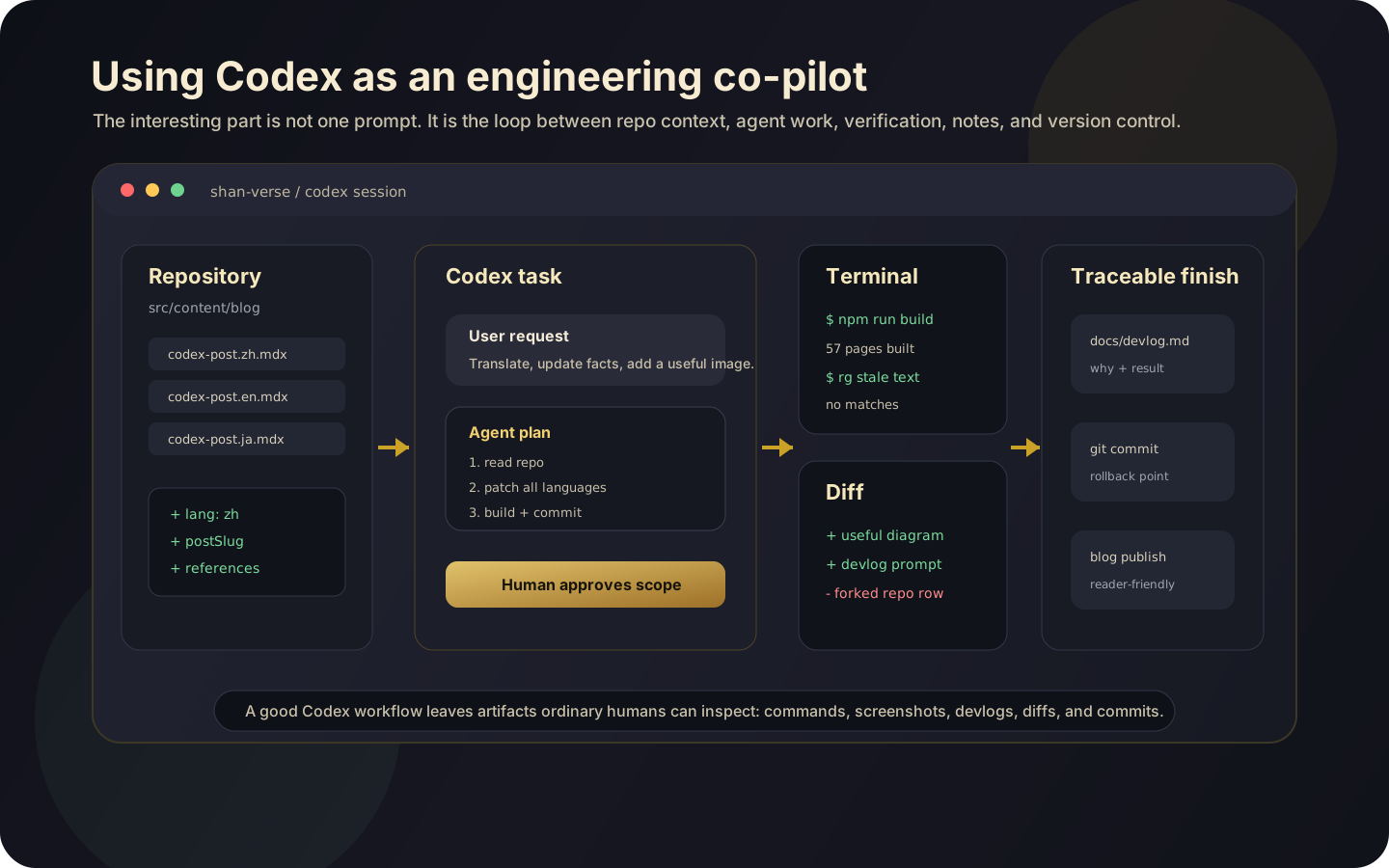
I especially recommend starting with “do not change code yet.” Often the biggest time saver is not immediate code generation; it is letting Codex rebuild the project context for you. With old projects, the expensive part is remembering why you wrote things the way you did.
Why Use Codex
To me, Codex’s value is not “code generation.” It is three deeper capabilities.
First, it lowers the friction of restarting old projects. Old projects often still have value, but reopening them means finding the entry point, installing dependencies, understanding state flow, and remembering deployment. Codex can do the first archaeology pass.
Second, it makes engineering quality work cheaper. In the past, I might have skipped README updates, tests, linting, release checklists, or mobile polish for a practice project. Now those tasks can be folded into the same loop.
Third, it changes the throughput of an individual developer. When one person maintains many projects, the scarce resource is not ideas but context switching. Codex’s threads, background work, and mobile approvals make it possible to move several independent lines forward: UI polish in one thread, tests in another, documentation in a third, release cleanup in a fourth.
Of course, Codex is not autopilot. It is closer to a very capable junior-to-mid engineering teammate who needs boundaries and review. You still need to provide goals, constraints, test commands, and stopping conditions. You still need to read the diff.
Safety Boundaries
The stronger Codex becomes, the more important it is not to treat it as “a chat box with unlimited shell access.” OpenAI’s 2026-05-08 safety article emphasizes principles I agree with: keep agents inside clear boundaries; make low-risk work smooth; pause high-risk work for approval; preserve telemetry and audit trails; use sandboxing, network policy, and credential controls.
My own minimum practice is:
- Check
git statusbefore each task, so I know what changed and who changed it; - Let Codex work on a branch rather than mixing it into temporary experiments;
- Avoid pasting real secrets, production tokens, or private files into the context;
- Ask it to state commands before approving high-risk actions;
- Require a final summary of changes, verification, and remaining risks;
- For UI work, ask for screenshots or browser verification; for logic/library work, ask for test output.
In other words, Codex does not replace engineering discipline. It amplifies it. Give it clear boundaries and it becomes highly effective. Give it vague goals and unlimited permissions, and it may efficiently expand the mess.
OpenAIRunning Codex safely at OpenAIOpenAI's safety practices for Codex sandboxing, approvals, network access, credentials, and audit logs.Open linkA Quick Start Path
If you have not used Codex seriously yet, I would not start with “build a new app.” A better exercise is to pick a small project you know well but have not touched recently:
- Ask Codex to read only: summarize structure, run flow, and the three most valuable fixes.
- Choose a low-risk task: README cleanup,
npm scripts, or one mobile layout issue. - Ask for a plan first: files to change and how to verify.
- Approve the implementation: let it edit, check, and report.
- Review the diff yourself: if it is not right, ask it to iterate from the diff.
- Ask for release notes: make the change record readable.
These are the prompt templates I use often:
Please read this repository first and do not change code.
Tell me:
1. where the entry point is;
2. how state flows;
3. which parts should be split into modules;
4. if I only had one day to refactor, what should I do first?
Please implement the smallest verifiable version of this feature.
Constraints:
- do not introduce a new framework;
- keep the existing UI style;
- change only necessary files;
- run npm run build afterward and explain the result.Please review the current diff, focusing on:
- runtime bugs;
- mobile layout risks;
- uncovered edge cases;
- places where documentation and behavior disagree.Please work in a debugging-first way:
1. reproduce or localize the bug before guessing at a fix;
2. after each change, write to docs/devlog.md with time, hypothesis, change, verification command, and result;
3. if verification fails, record the failure and likely cause in the devlog too;
4. after verification passes, inspect git diff and explain the important changes;
5. finally create a small, clear git commit so the change is easy to roll back or bisect later.These prompts do not look fancy, but they work. Codex does not need ornate instructions as much as it needs engineering boundaries.
Conclusion
After this Codex update, my biggest takeaway is not “AI writes code faster.” It is that the software engineering workbench has become wider. Codex no longer waits only inside the editor. It can move between local machines, cloud, browser, and mobile. It no longer only generates snippets. It can work around a goal, read repositories, edit files, run commands, show diffs, and wait for approval.
For someone like me, with many old projects, practice projects, a personal website, and research prototypes, this hits the exact pain point. Old projects are hard to restart. Personal sites are hard to keep polished. Practice projects are easy to leave without engineering cleanup. Codex cannot decide my taste or direction, but it can bring the deferred engineering work to the surface so that I only need to judge, constrain, and verify.
So if you ask me why use Codex, my answer is: because it lets one person maintain projects at a rhythm closer to a small team. But only if you use it like a real engineering teammate: give it context, boundaries, tests, and review.
References
- OpenAI. Codex for (almost) everything, 2026-04-16.
- OpenAI. Work with Codex from anywhere, 2026-05-14.
- OpenAI. Introducing the Codex app, 2026-02-02; Windows update on 2026-03-04.
- OpenAI Help Center. Using Codex with your ChatGPT plan, accessed 2026-05-24.
- OpenAI Help Center. About ChatGPT Pro tiers, accessed 2026-05-24.
- OpenAI Help Center. Codex 费率表, accessed 2026-05-24.
- OpenAI Developers. Codex web, accessed 2026-05-24.
- OpenAI Developers. Code generation, accessed 2026-05-24.
- OpenAI. Running Codex safely at OpenAI, 2026-05-08.
- OpenAI Help Center. OpenAI Codex CLI - Getting Started, accessed 2026-05-24.
- OpenAI Developers. Custom instructions with AGENTS.md, accessed 2026-05-24.
- GitHub. openai/codex, accessed 2026-05-24.
- Simon Willison. Agentic Engineering Patterns, accessed 2026-05-24.
- Stephen Cox. AI coding best practices, 2026-01-04.
- Hacker News. OpenAI Codex CLI: Lightweight coding agent that runs in your terminal, accessed 2026-05-24.
- Y Combinator on X. Discussion of Andrej Karpathy’s “vibe coding” framing, 2025-03-05.
- OpenAI Developers on X. Codex workflows discussion announcement, 2026-04-06.
- Ramya Chinnadurai on X. Discussion of Karpathy’s point about CLIs and agents, 2026-02-24.
- Shuster et al. SWE-chat: Coding Agent Interactions From Real Users in the Wild, arXiv, 2026.
- Niu et al. AIDev: Studying AI Coding Agents on GitHub, arXiv, 2026.
- GitHub. Public repositories under
huiishan99, commit metadata accessed via GitHub REST API on 2026-05-24.
Comments
Loading comments…